Importing official match reports
The match report from nuLiga or Handball360 contains every goal, penalty and time-out with the match time. myHandballStats reads the PDF – as a new game or to compare it with what you tracked yourself.
In five steps
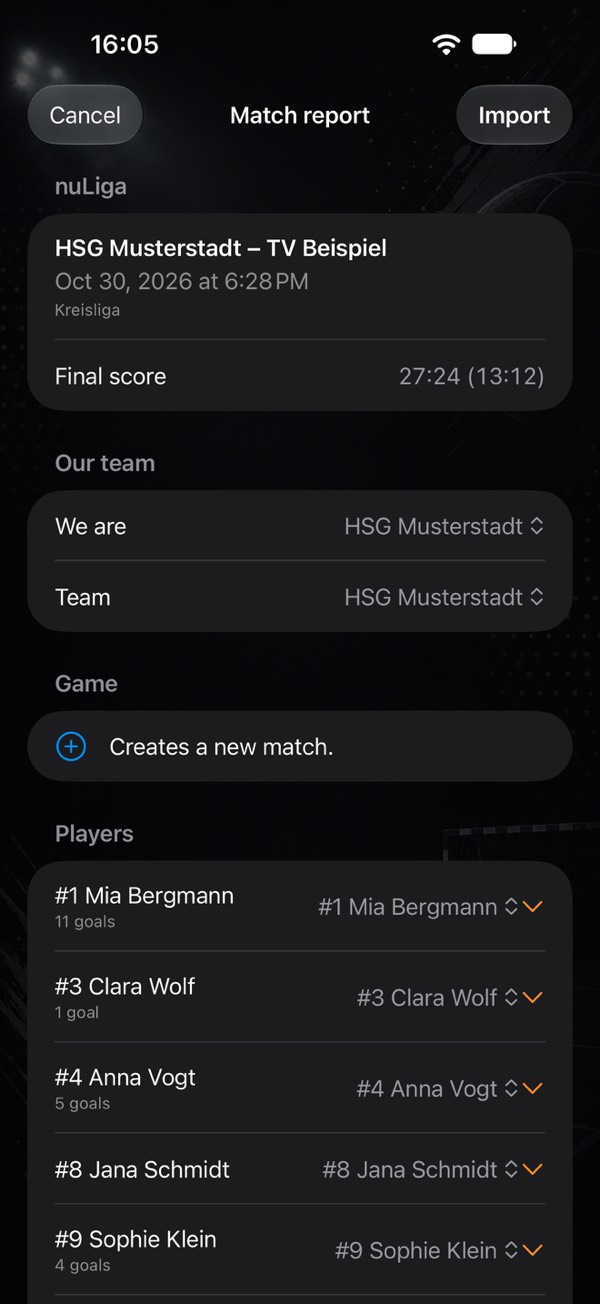
- Get the report as a PDF. Download the official match report of your game from nuLiga or Handball360 as a PDF – just as you would to print it. myHandballStats never fetches anything from the internet itself; it only reads the file you give it.
- Open it in the app. In the games list, tap the document icon next to “+” and choose the PDF. Or share the PDF from Mail, Safari or Files and pick Open in myHandballStats.
- Check “We are …”. The app recognises from the team name whether you played at home or away, and which game the report belongs to: a new one, a scheduled one or one imported before (that one is replaced, not duplicated).
- Assign players and goalkeepers. For every person in the report: existing player, Create new or Ignore. The report does not name goalkeepers – mark them under Goalkeepers. With several, choose who was in goal at the start and add goalkeeper changes with the match minute.
- Import. Only now is anything written. The game is then finished, with final score, squad, shirt numbers for this game and every action with the official match time.
What the report turns into
| In the report | In the app |
|---|---|
| Goal | Goal for the scorer |
| 7m scored / not scored | 7m “Goal” or “Saved” (whether it was saved or missed is not in the report) |
| Warning, 2 minutes, disqualification | Penalties for the player (yellow, 2 minutes, red, blue) |
| Time-out | Time-out – yours or the opponent's |
| Opponent goal | Goal conceded for the goalkeeper who was in goal at the time |
| Opponent 7m not scored | 7m save for the goalkeeper |
| Opponent penalty | Penalty (opponent) – the basis of the power play balance |
| Match time | Match minute and half – the match log is complete |
Missed shots, saves in open play, technical faults and assists are not in the report. The myPI of an imported game therefore only knows goals, 7m and penalties – the match report in the app says so.
Goalkeepers and goalkeeper changes
In myHandballStats, who is in goal is a state of the game, not a fixed property – in youth and amateur handball a field player sometimes goes in goal. When importing you mark the goalkeepers; anyone listed as goalkeeper in the team is preselected. Every goalkeeper change applies from its match time. You can also add changes later in the game via “…” → Goalkeeper change: for imported games, goals conceded and saved 7m then go to whoever was in goal at that time. Goals conceded that were tracked live keep the goalkeeper who was marked when they were tapped.
Tracked it yourself? Compare
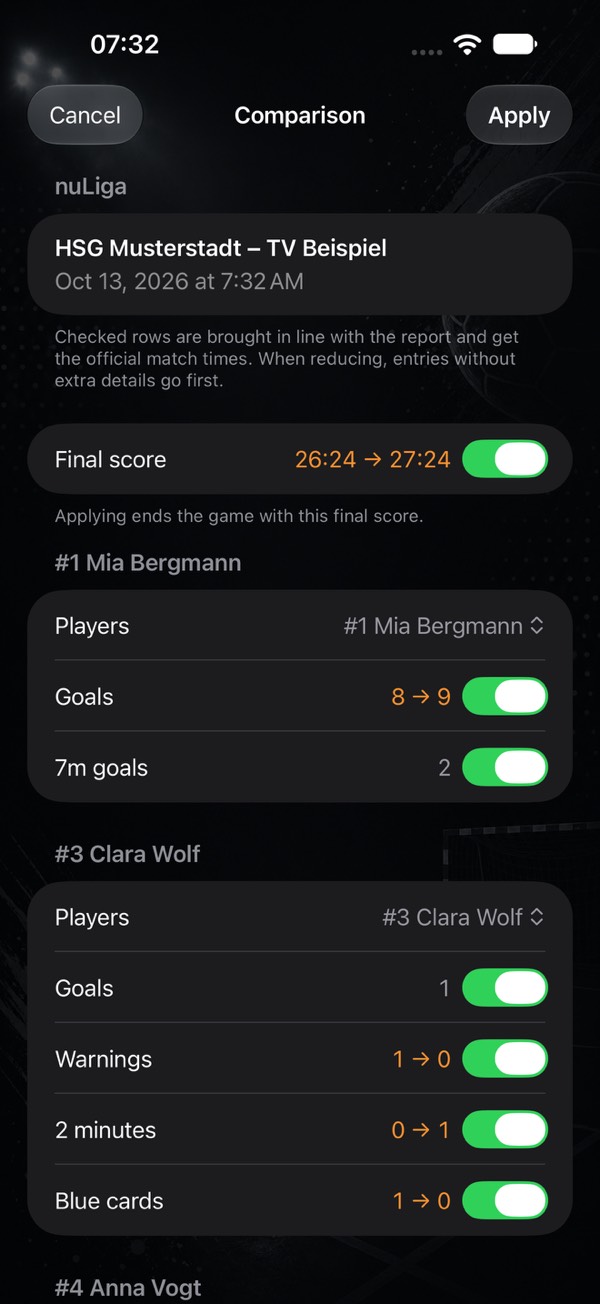
If you tracked the game live, importing never overwrites your tracking. Instead, in the game: “…” → Compare with match report (or Compare with my tracking in the preview). For every player and for the team you see “tracked → in the report”, each row with a checkmark.
- Only checked rows are applied. Players you tracked who are missing from the report are not preselected – usually just the assignment is off.
- Your extra details stay. When a number has to go down, entries without goal zone or shot position go first.
- Goals without a player (tapped via the score, for example) go first to players who are missing goals according to the report.
- Official match times: after applying, every compared action carries the time from the report.
Power play and short-handed
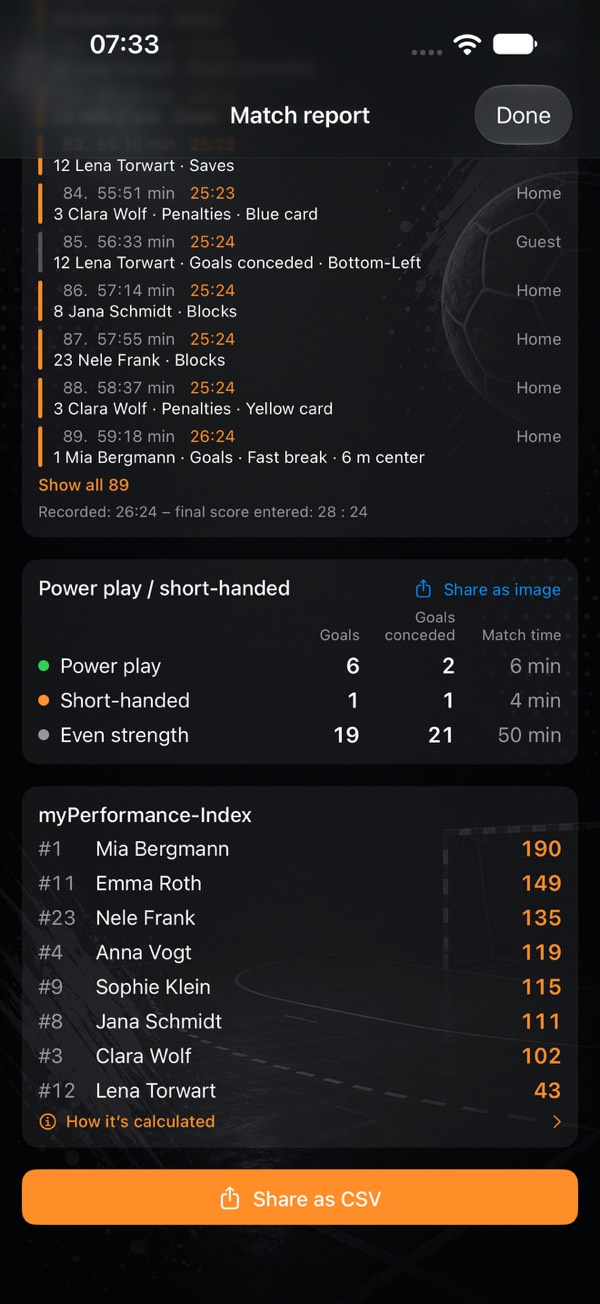
From both teams' suspensions the app works out when you had one player more or fewer on court. The match report and the season analysis show this as a block of three rows:
| Row | Goals | Goals conceded | Match time |
|---|---|---|---|
| Power play | 6 | 2 | 6 min |
| Short-handed | 3 | 4 | 8 min |
| Even strength | 19 | 18 | 46 min |
- Power play – you had at least one player more (the opponent was serving a suspension). Short-handed – you had fewer. Even strength – equal numbers, even if both sides had someone off at the same time.
- Goals and goals conceded – counting only that phase. “Power play 6 / 2” means: with the extra player you scored six and conceded two.
- Match time – how long you played in that state in total, in whole minutes. A duration, not a clock time: “6 min” is six minutes, added up over all suspensions in the game – say, three opponent suspensions. The three rows add up to the playing time with recorded times, normally 60 min.
- In the season analysis the total across all games comes first. Below it, “Ø per game” shows what an average game brings: goals and goals conceded in power play and short-handed, and how many suspensions led to them (the opponent's for power play, your own for short-handed) – rounded to whole numbers. At the bottom are the total suspensions of both teams and the games with usable suspensions the figures come from.
- Share as image – the block can be shared as an image for feed, story or landscape, headed by the matchup or by team and season.
A suspension always runs the full two minutes, even if a goal is scored. On the third suspension nuLiga lists “2 minutes” and “disqualification” at the same second – that counts as one short-handed spell, not two. Opponent penalties cannot be tracked live; they come from the report. If they are missing, the app says so below the block – an empty power play then says nothing about the game.
If something goes wrong
“The PDF contains no readable text”
That is a scanned or photographed report. Only PDFs generated by nuLiga or Handball360 can be read.
“This is not a match report from nuLiga or Handball360”
Supported are reports from Germany and Austria (nuLiga) and Handball360 – in the full and the reduced version. In addition, match reports from France (FDME) and Croatia (HRS) are supported.
“The report was not read completely”
The app checks itself: if the final score, the sequence of goals and the squad table do not add up, it warns instead of silently losing a goal. You can still import – check the game afterwards, and feel free to send us the case via the feedback in the app.
“Not approved yet”
The report may still change. If you import it again later, the game is updated rather than duplicated.
What costs Premium – and what doesn't
Choosing a PDF and viewing the preview is free. Importing, comparing and the power play balance are Premium. Recording goalkeeper changes during the game works for everyone.
- Getting started: from an empty phone to your first stats
- Tracking player development: handball stats for youth teams and parents
- What counts as what? Every stat explained
- Goalkeeper and goals conceded
- Game clock, time-outs and match log
- End a game and enter totals
- Live session: record together
- myPI explained: the performance value per player
- Season record: record, form, fair play and 7 metres
- Shot radar: scoring rate per shot position
- Player comparison and shot maps of the top scorers
- Squads and schedules as a table
- Sharing a player as an image
- Match report as PDF: print and pin up
- Backups, switching devices, iCloud
- Free or Premium: what you get without buying
- Tips: quick questions, quick answers
Opens the print dialog – choose “Save as PDF” there. The page is laid out for it.