Sharing a player as an image
A player's stats as a ready-made image – for Instagram, a WhatsApp status or the team chat. As a player card with a photo or as a template with key figures, fair play and 7 metres, for all games or a single one. No Premium needed.
Step by step
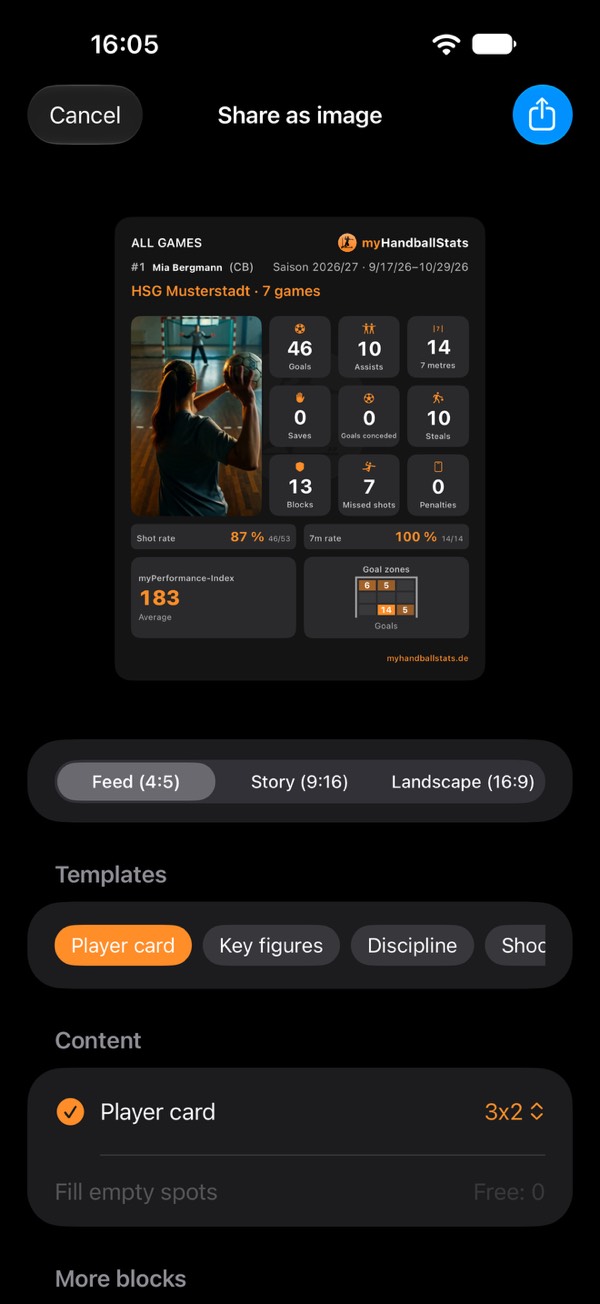
- Open the player. In the Players tab, tap the player. Without any stats yet, the share icon is greyed out – no numbers, no image.
- All games or one game. The share icon at the top right starts with the stats across all games. Pressing and holding a game in their list starts with exactly that game – with the fixture, score, date and round. You can switch between the two in the sheet under Player card at any time.
- Choose a template. Player card is the classic image with header, tiles, rates and photo. Key figures shows the tiles with shot rate and 7m rate, Discipline shows fair play and 7 metres. Under Content you'll find the blocks of the image – you can deselect each one and select it again. If that leaves space free, Fill empty spots fills it with matching key figures.
- Choose the name. Name, First name or just the Number (“#7”). For youth players, first name or number only is often the better choice – the image goes to people outside the team. The app remembers your choice.
- Add a photo (optional). If the player card is in the image: Choose photo from your photos or Take photo with the camera. It appears as its own tile – Portrait or Landscape. Set the crop right in the preview: drag with one finger, zoom with two. Without a photo, the shirt number is shown large in its place.
- Choose the format and share. Feed (4:5) for Instagram and Facebook, Story (9:16) for stories and WhatsApp status, Landscape (16:9) for websites and presentations. The story has more room – the template then adds matching blocks, such as fair play and 7 metres next to the player card. Share opens your device's share menu; on Android there is also Save to gallery. The app remembers the template and format for next time.
What's on the image
| Area | Content |
|---|---|
| Header | Name in the chosen form, number and position; for all games the teams and number of games, for one game the fixture, score, date and round |
| Stats | The totals per stat type as tiles. Under Tile settings you choose and order them – the first nine appear in every format, story and landscape show a few more |
| Rates | Shot rate, 7m rate and save rate – only when there were attempts |
| Photo | Portrait or landscape, if you chose one |
| More blocks | Depending on the template and format: key figures, fair play, 7 metres and the number of games |
| With Premium | Also the myPI (all games: the average, one game: that game's value) and the goal zones on the player card |
The numbers are the same as in the app: for “7 metres” only goals count, and a number in a game comes from that game's squad.
On every card, too
The same share sheet opens in many places in the app: the share icon on the cards in the player detail – such as Fair play, 7 metres or Attack type – starts with exactly that card and adds matching blocks. It works the same way in the team view, the match report and the season analysis. An image always shows just one player, one team or one game.
Photos, names and privacy
- The photo is not stored. It only goes into this one image. The app only receives the photo you pick – not the rest of your library.
- You decide what's visible. Name, first name or number only, with or without a photo. For children and teenagers, ask first whether the image may be shared.
- Metadata: the image carries the app's name, “© myHandballStats”, the web address and the date – no names, no location. Messengers and social networks strip such details on upload anyway.
What Premium costs – and what doesn't
The player card and templates are free for everyone – with photo, all formats and name options; without Premium you can deselect a template's blocks and select them again. With Premium, the myPI and goal zones are added to the player card, plus the templates Shooter profile, Shot map, Shot radar and Overall statistics. And you can build images entirely yourself: add blocks, arrange them and set their size.
- Getting started: from an empty phone to your first stats
- Tracking player development: handball stats for youth teams and parents
- What counts as what? Every stat explained
- Goalkeeper and goals conceded
- Game clock, time-outs and match log
- End a game and enter totals
- Live session: record together
- myPI explained: the performance value per player
- Season record: record, form, fair play and 7 metres
- Shot radar: scoring rate per shot position
- Player comparison and shot maps of the top scorers
- Squads and schedules as a table
- Importing official match reports
- Match report as PDF: print and pin up
- Backups, switching devices, iCloud
- Free or Premium: what you get without buying
- Tips: quick questions, quick answers
Opens the print dialog – choose “Save as PDF” there. The page is laid out for it.