Season record: record, form, fair play and 7 metres
How is the season going? The season record sums it up at the top of the team view – results, form, penalties and 7 metres. No Premium needed, for every team and every season.
Where to find it
Right at the top of the team view, in the Season record section. Above the cards you choose the season or All games. The default is the current season; if the team has no game in it yet, the last season with games.
Which games count
- Games with a result: ended, with a final score entered, or with recorded goals or goals conceded. A final score takes precedence over recorded goals.
- Only up to today: a game from today only counts once you have ended it. That way the record doesn’t jump while the game is running.
- Scheduled games, e.g. from an imported fixture list, don’t count.
- None yet? Then a note appears instead of the cards.
Record
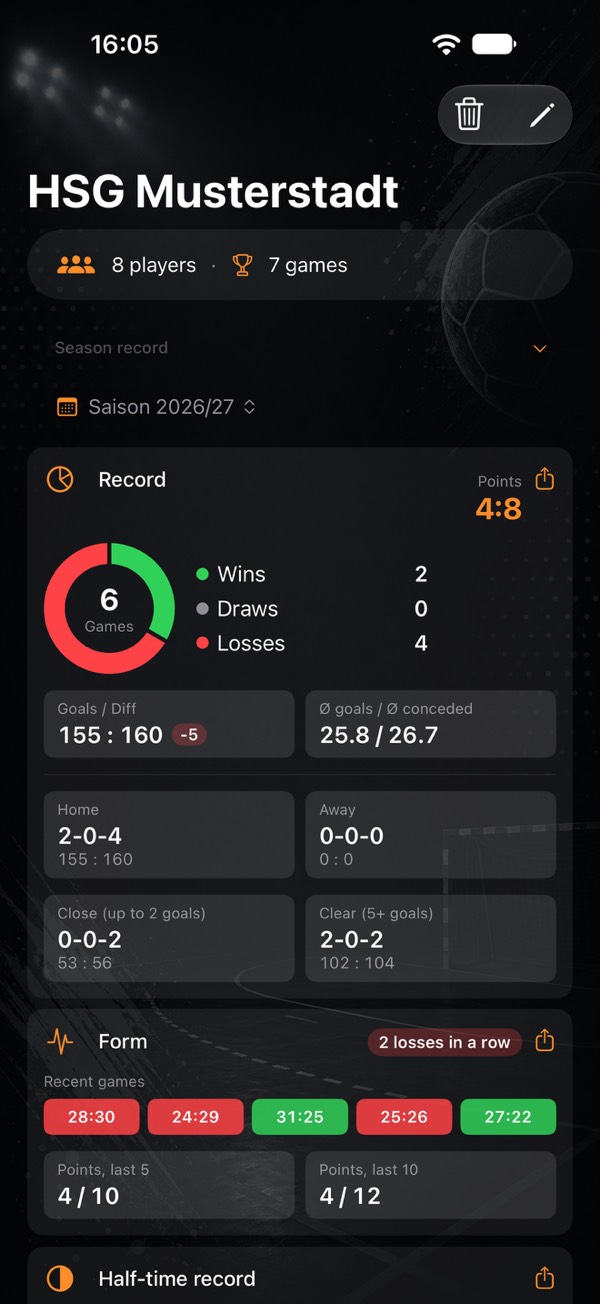
| Part | Content |
|---|---|
| Ring | Share of wins, draws and losses, the number of games in the middle |
| Points | By the 2:0 rule: win 2:0, draw 1:1, loss 0:2 |
| Goals / Diff | Goals for and against, and goal difference |
| Ø goals / Ø conceded | Per game, with one decimal place |
| Home / Away | Wins-draws-losses and goals, separately |
| Close (up to 2 goals) | The same for close games, draws included |
| Clear (5+ goals) | The same for clear games |
The app doesn’t show a league position: it only knows your team’s games.
Form
- Recent games: the results of the last five, green, grey or red.
- Streak: identical results counting back from the latest game, for example “3 wins in a row”.
- Points, last 5 and last 10: won out of possible, for example 7 / 10.
Half-time record
Wins-draws-losses after leading, level and trailing at the break, plus the goals per half. A game only counts here if every goal and goal conceded carries a half and the goals add up exactly to the result. Otherwise the app doesn’t know the half-time score, and nothing is estimated. The half comes from the game clock or from an imported match report (both Premium). At the bottom it says how many games that is, e.g. “Based on 8 of 12 games”.
Records and record by opponent
- Records: biggest win, biggest loss, highest-scoring game, longest winning streak, longest unbeaten run. In case of a tie the more recent game counts; a row without a value is left out.
- Record by opponent: wins-draws-losses and goals, most games first, five visible, the rest via Show all … opponents.
The app recognises opponents by name. Upper and lower case, accents and double spaces don’t matter; any other spelling makes a separate opponent. The name shown is the one from the latest game.
Fair play and 7 metres
Fair play: yellow cards, 2 minutes, red and blue cards, large Ø per game, small the total. Older penalties without a type appear as “… without type” below.
7 metres: the rate as a gauge with goals and shots, below it 1st and 2nd half if the 7 metres were recorded with match time. Only goal, saved and missed count as a shot. Drawn and Conceded are not shots, see What counts as what?
Per player: the same cards appear as the Fair play and 7 metres sections in the player detail, per game calculated over the games in which they were in the squad. Goalkeepers also get 7m saves, see Goalkeeper and goals conceded. Record and form don’t exist per player – a result belongs to the team.
In the match report: match overview and head-to-head
In the match report and in an ended game, not during live recording:
- Match overview: both teams side by side, home on the left, away on the right – converted 7 metres, yellow cards, 2 minutes, red and blue cards, time-outs. Rows with no data on either side are left out. If nothing is recorded for the opponent, it shows “–” instead of 0, because 0 would mean “no penalty”.
- Head-to-head: the record against this opponent across all seasons, with the most recent meetings. It appears from two counted games on.
Sharing and home screen
- Share as image below the cards: record and form with team and season, as Feed, Story or Landscape.
- Home screen: at the top there is a small season record with points, wins, draws, losses and the last five results. Tapping it opens the team. Turn it off via Add tiles → Show team season record.
Only the last 3, 5 or 10 games
In the season analysis (Premium) and in the player detail you choose All games or Last 3, 5 or 10 games: the most recent games with a result, by the same rules as above; for a player only games with them. The app remembers the choice per view.
- Filtered in the player detail are overall stats, fair play, 7 metres, myPI, shot map, shot radar and attack type including their images; in the season analysis, all sections.
- Not filtered are the line below the player’s name, their teams and their list of games. The season record only has its season picker.
Two extras with Premium
- Attack type: the rate by fast break, breakthrough, pivot, free throw and back court, in the player detail, in the season analysis and in the match report.
- Save percentage per goal zone: in the shot map under Save, switch from count to rate. Zones with fewer than 3 shots stay grey.
More analyses with Premium: Shot radar and Player comparison.
- Getting started: from an empty phone to your first stats
- Tracking player development: handball stats for youth teams and parents
- What counts as what? Every stat explained
- Goalkeeper and goals conceded
- Game clock, time-outs and match log
- End a game and enter totals
- Live session: record together
- myPI explained: the performance value per player
- Shot radar: scoring rate per shot position
- Player comparison and shot maps of the top scorers
- Squads and schedules as a table
- Importing official match reports
- Sharing a player as an image
- Match report as PDF: print and pin up
- Backups, switching devices, iCloud
- Free or Premium: what you get without buying
- Tips: quick questions, quick answers
Opens the print dialog – choose “Save as PDF” there. The page is laid out for it.